Why Students Find Workarounds, and What the Right Systems Can Do to Keep Students Focused
Author: Channing Anderson – Product Manager
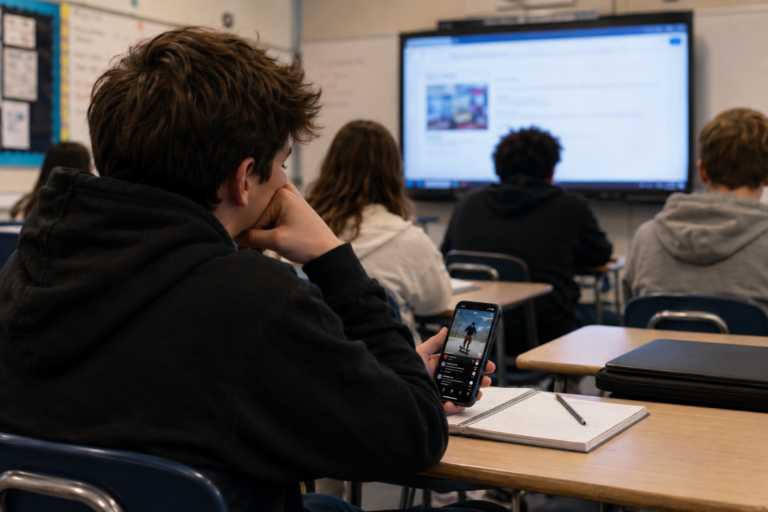
Students don’t bypass systems to break rules. They do it when the experience doesn’t work for them. When filtering feels inconsistent or overly restrictive, students adapt. Students aren’t hackers. They’re problem solvers. Research and reporting consistently show that students often bypass filtering systems out of frustration, access limitations, or inconsistent experiences rather than malicious intent. A 2024 investigation by The Markup found that students commonly turn to VPNs, proxies, or personal devices when legitimate educational resources are blocked or filtering policies feel overly restrictive. Smart solutions don’t fight this behavior; they guide it.
There are solutions that have been developed with the intent to protect students while leaving them free to explore the world of suitable content. See below to understand what some of the common challenges are with many solutions out there and what to look for in a superior solution.
Make Sure You Have a Systematic Approach for Indexing Sites.
Blocking one site at a time doesn’t scale. New versions can appear instantly embedded in a Google site or concealed under another innocuous domain.
Modern Platforms provide granular options to restricting content and ensure that students have access to only the right content with features like:
- Category + content-aware filtering: Filters websites and online content based on both the site category and the actual content being viewed, helping schools block inappropriate or risky material more accurately.
- YouTube-level control: Granular control over YouTube access, including the ability to restrict videos, channels, comments, searches, and viewing modes based on school policies and student age groups.
- Understand intent, not just URLs: Apply advanced analysis to identify the purpose and meaning behind online activity, allowing the platform to detect risky or inappropriate behavior even when harmful content is hidden behind safe-looking websites or searches. Research and industry analysis increasingly point toward intent-aware filtering as a more effective alternative to blanket blocking (Mathewson).
Go Beyond Basic VPN Blocking with Evasion Detection
Reactive blocking can unintentionally teach students how to get around restrictions. When a student uses a VPN (a tool that routes their internet connection through another network to hide or change their location), they may see that it successfully bypasses filtering. This can reinforce the idea that using these workarounds is acceptable, leading them to keep trying other VPNs or similar methods to access blocked content. Security reporting from DNSFilter found significant spikes in traffic to proxy and circumvention services within school environments.
Better Systems stop bypass attempts before they succeed through:
- Network + device-level enforcement: Applies filtering and security policies across both the school network and individual devices, helping ensure students remain protected whether they are on campus or learning remotely.
- VPN detection and prevention: Detects and blocks attempts to bypass school filtering through VPNs, proxies, or other circumvention tools, helping maintain consistent internet safety and compliance.
- App-level control (block, isolate, monitor): Gives schools the ability to manage specific applications by blocking access, limiting functionality, isolating risky apps, or monitoring activity to support student safety and appropriate use.
Ensure you can See Complete Device Activity in Real Time
Students often multitask across tabs, apps, and devices during class, but without clear visibility, teachers may struggle to understand whether students are engaged, distracted, or off task. Researchers note that better visibility and guided device management strategies can help reduce distraction without completely removing access to technology (Springer, & Yale Poorvu Center). Full device visibility gives teachers real-time insight into student activity, helping them make informed decisions, support engagement, and address issues with confidence instead of guesswork.
Better Systems work seamlessly across your ecosystem offering:
- Full device visibility; not just browser tabs: Gives educators and IT teams visibility into overall device activity, background windows, and system behavior, not just what students are viewing in a web browser.
- App awareness & reporting: Identifies and reports on the applications students are using, helping schools understand usage patterns, detect concerning activity, and support informed decision-making.
- Granular controls to reduce distractions: Allows schools and teachers to apply targeted controls to apps, websites, and device functions, helping minimize distractions and keep students focused during learning time.
Track Device Activity Even When Students Switch Accounts
Students often switch accounts not to “hack” the system, but to access content, apps, or settings that may be restricted on their school assigned profile. Without visibility across non-managed accounts, schools can lose oversight around student activity and device usage. By maintaining awareness, schools can reduce circumvention, improve accountability, and ensure policies follow the student.
Better Systems work with students, not against them providing protection and oversight through:
- Coverage for non-managed accounts/devices: Extends visibility and policy enforcement beyond school-managed accounts and devices, helping schools monitor activity and maintain protection even when students use personal accounts or unmanaged devices.
- Full reporting across users and traffic: Provides comprehensive reporting across users, devices, applications, and network traffic, giving schools a complete view of activity, trends, and potential concerns across the environment.
Closing
Old Approach:
Block more. React faster. Chase behavior.
Better Approach:
Understand behavior. Reduce friction. Guide students.
Students don’t wake up trying to bypass systems. They’re navigating them. When systems are fragmented, inconsistent, or overly restrictive, students naturally look for workarounds to complete tasks, access resources, or avoid disruptions. The result is often an endless cycle of blocking, reacting, and escalating controls.
Research into student technology behavior suggests that overly rigid or inconsistent digital environments can unintentionally increase workaround behavior and disengagement. Schools are increasingly shifting toward balanced approaches that combine visibility, flexible controls, and guided digital citizenship rather than relying solely on restrictive blocking (Yale Poorvu Center).
References:
- The Markup — Schools Were Just Supposed To Block Porn. Instead They Sabotaged Homework and Censored Suicide Prevention Sites https://themarkup.org/digital-book-banning/2024/04/13/schools-were-just-supposed-to-block-porn-instead-they-sabotaged-homework-and-censored-suicide-prevention-sites
- MaTHEWSON, TARA GARCÍA. CalMatters — Frustrated by school web filters, one teenager created his own https://calmatters.org/education/2024/07/web-filter/
- DNSFilter — Students Bypass School Security Controls https://www.prnewswire.com/news-releases/dnsfilter-data-reveals-major-threat-vector-as-students-bypass-school-security-controls-302625062.html
- Springer — Distraction, multitasking and self-regulation inside university classroom https://link.springer.com/article/10.1007/s10639-024-12786-w
- Yale Poorvu Center — Devices in the Classroomhttps://poorvucenter.yale.edu/teaching/teaching-resource-library/devices-in-the-classroom
More about our author:
Channing Anderson, a former Director of IT Operations at East Point Academy in Columbia, SC and current StudentKeeper Product Manager at Ativion shares some key considerations any IT professional in the education space should consider when exploring web filtering and device management capabilities. Use this document to understand what to look for in a leading technology.
Would you like to talk to Channing and learn more about our StudentKeeper solution?
Find Channing on LinkedIn: https://www.linkedin.com/in/channingpowersanderson/ or reach out via our contact form to schedule a demo today!